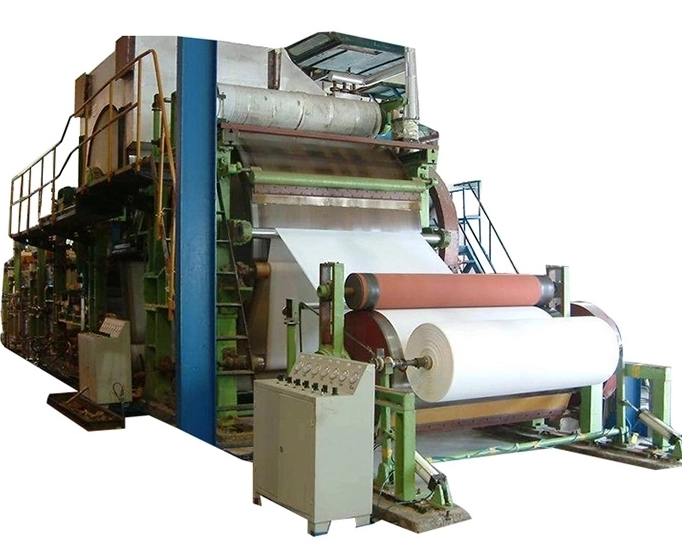
Selecting the right Paper making Machine for your printing business can make a significant difference. A high-quality Paper making Machine enhances print quality and helps you meet your business needs efficiently. Consider what you require from your Paper making Machine and other printing equipment. The right setup with a reliable Paper making Machine allows you to handle more printing jobs and keeps your customers satisfied. Paper making Machines also impact your costs and profits. By aligning your Paper making Machine with your printing goals, you position your business for success.
Key Takeaways
You should know what your business needs before you buy a paper making machine. Think about how much you want to make, what kinds of paper you need, how much money you can spend, and how much space you have.
Pick a machine with the right features. Look for things like how much it can make, if it works by itself, if it saves energy, and if it is easy to fix. These things can help you get better prints and save money.
Look at both new and used machines. Check sellers from your area and from other countries. Make sure to check the warranty and support so you can buy smart.
Try out machines with demos and samples. Ask experts for help so you do not get any surprises. This will help you find the best machine for your printing work.
Think about all the costs. This includes setting up, training, fixing, and how much power it uses. Pick a machine that fits your budget and helps your business grow.
Define Business Needs
Before you buy a paper making machine, think about what your business needs. This helps you avoid spending money on the wrong equipment. It also makes sure your new machine fits your goals. Let’s look at the main things to think about.
Production Volume
Think about how much printing you do each day or month. Do you have a small shop with custom orders? Or do you print a lot for big customers? Your answer will help you choose the right machine. If you print a lot, you need a machine that works fast and does not break. Some machines are good for small jobs. Others are made for big jobs that never stop.
Tip: Write down your usual order size and your busiest months. This will help you find a machine that fits your real work.
Paper Types
Not every machine can use every kind of paper. You may need to print on thick cardstock or glossy sheets. Some people use special paper for paper cup production equipment. Check if the machine can use the paper you need. Some only work with normal paper. Others can use many types and finishes. If you do custom printing, you need a machine that can change paper types easily. Good print quality depends on using the right paper with the right machine.
| Paper Type | Machine Needed | Print Quality Impact |
| Standard Office | Basic Machine | Good |
| Cardstock | Heavy-Duty Machine | Excellent |
| Glossy/Coated | Specialized Machine | High |
| For Cups/Packaging | Paper cup production equipment | Custom |
Budget
Decide how much money you can spend before you shop. Machines can cost a few thousand dollars or much more. Remember to add costs for setup, training, and fixing the machine. A cheap machine may cost more later if it breaks or uses too much power. Think about if the machine will help your business grow or just do what you need now.
Note: Save some extra money for things you did not plan for or for upgrades.
Space and Size
Measure your work area before you buy a machine. Some machines are very big and need lots of space. You also need room for paper, finished work, and supplies. Make sure your floor is strong enough for the machine. Check if you have the right power and air flow. If you want more machines later, plan for that space now. Good planning now will help you avoid problems later.
Ask yourself:
Do I have enough space for a big machine?
Can I move things around the work area easily?
Is there space if I want to add more machines?
Picking the right paper making machine starts with knowing what your business needs. When you match your work amount, paper types, and budget to your goals, you get better print quality and easier work. Take your time with this step. The right choice now will make every job easier and help you earn more money.
Paper Making Machine Features
When you look for a paper making machine, you want to make sure it has the right features for your business. These features can change how well your printing jobs turn out. Let’s break down what you should check before you buy.
Capacity
Capacity tells you how much paper your machine can make in a set time. If you run a busy shop, you need a machine with high production capacity. This means you can finish big printing orders fast. If you only do small jobs, a smaller machine might work better for you.
Tip: Always match your machine’s production capacity to your busiest months. This helps you avoid delays and keeps your customers happy.
A machine with the right capacity helps you keep up with demand. It also makes sure your print quality stays high, even when you have lots of orders.
Automation
Automation makes your work easier. Some printing machines do many steps by themselves. You just set them up and let them run. This saves you time and helps you avoid mistakes. A higher level of automation means you can do more printing with less effort.
If you do custom printing or need to switch jobs quickly, automation helps you stay flexible. You can take on more orders without hiring more people.
Energy Efficiency
Energy efficiency matters for your bills and the planet. Some paper making machines use less power to do the same job. This saves you money every month. It also helps you run a greener business.
| Machine Type | Energy Use | Cost Savings | Eco-Friendly |
| Standard | High | Low | No |
| Energy Efficient | Low | High | Yes |
Look for machines with energy-saving features. Over time, these features can make a big difference in your costs.
Maintenance
Every machine needs care. Some printing machines need more maintenance than others. If you pick a machine that is easy to clean and fix, you will have less downtime. This means you can keep printing without long stops.
Note: Ask the seller about spare parts and support. Good support makes maintenance much easier.
A machine that is simple to maintain helps you keep your print quality high. It also lasts longer, so you get more value for your money.
Printing Compatibility
Not all machines work with every type of printing job. You need to check if your machine matches the papers and inks you use. If you work with special papers, like those for paper cup production equipment, make sure your machine can handle them. Some machines only work with basic paper, while others can do custom jobs.
Printing compatibility also affects your print quality. If your machine matches your needs, you get sharp, clear prints every time. This is key for high-quality printing and happy customers.
Ask yourself:
Does this machine work with my favorite paper?
Can it handle custom orders?
Will it keep my print quality high?
Choosing the right features in your paper making machine helps you get the best results. You can boost your production capacity, save money, and keep your customers coming back for more printing jobs.
Compare Options
When you look for the best printing machines, you have a lot of choices. You want to make sure you pick the right one for your business. Let’s break down your options so you can feel confident about your decision.
New vs. Used
You might wonder if you should buy a new or used machine. New printing machines come with the latest features. They usually work faster and give you better print quality. You also get a full warranty, which means less worry if something breaks. Used machines cost less. They can be a good choice if you want to save money or if you are just starting out. But, used machines may need more repairs. Sometimes, they do not work as well as new ones.
Tip: If you choose a used machine, ask for a test run. This helps you see if it meets your printing needs.
Local vs. International
You can buy printing machines from local sellers or from companies in other countries. Local machines are easier to check before you buy. You can visit the seller, see the printing equipment, and ask questions. If you need help, local support is faster. International machines sometimes offer more advanced features or lower prices. But, shipping takes longer. Getting spare parts or service can be harder.
| Option | Pros | Cons |
| Local | Fast support, easy visits | May cost more |
| International | More choices, lower prices | Slower service, shipping |
Warranty & Support
Always check the warranty and support before you buy. A good warranty protects you if your printing machine breaks. Support matters too. You want to know who will help you if you have problems. Ask about spare parts. If you cannot get parts quickly, your printing jobs might stop. Good support keeps your business running and your customers happy.
Remember: Strong support and a good warranty can save you time and money in the long run.
Make the Decision
Demos & Samples
You want to see how a machine works before you buy it. Ask the seller for a demo. Watch the machine in action. See if it handles your printing jobs well. You can also ask for samples. Hold the finished paper in your hands. Check the print quality. Look for sharp lines and even colors. If you print on special paper, bring your own samples. Test the machine with your real printing needs. This step helps you avoid surprises later.
Tip: Take notes during the demo. Write down what you like and what you do not like about each machine.
Expert Advice
You do not have to make this choice alone. Talk to people who know about printing machines. You can ask other business owners, join online forums, or speak with industry experts. Many sellers have staff who can answer your questions. Ask about the best machine for your printing jobs. Find out which machines last the longest or need the least repair. Experts can help you spot hidden costs or common problems.
Total Cost
Look past the price tag. The real cost of a printing machine includes more than just buying it. Think about setup, training, and regular maintenance. Some machines use more power or need special supplies. Add up these costs for each option. Make a simple table to compare:
| Machine | Price | Setup | Maintenance | Power Use | Total Cost |
| A | $$$ | $$ | $ | $$ | $$$$ |
| B | $$ | $ | $$ | $ | $$$ |
You want a machine that fits your printing needs and your budget. A smart choice now saves you money and trouble later.
Conclusion
Choosing the right paper making machine is crucial for your printing business’s success. By following this guide, you can ensure a smart investment based on your needs—whether it’s production volume, paper types, or budget. A well-planned decision today leads to better results tomorrow. For further assistance, consult experts or explore more resources.
At FRD Paper Machine Manufacturer, we provide reliable, eco-friendly machines designed for durability and efficiency, helping your business thrive in the competitive paper industry.
FAQ
What is the most important thing to check before buying a paper making machine?
Make sure the machine fits your business needs. Think about how much you print, what paper you use, and your budget. This helps you pick the right machine and not waste money.
How often do I need to maintain my paper making machine?
You should follow the maker’s care plan. Most machines need cleaning and checking every week. Taking care of your machine helps it work well and last longer.
Can I use one machine for different types of paper?
Some machines can use many kinds of paper. Others only work with certain paper. Always ask the seller or read the manual before using new paper. This keeps your machine safe from damage.
Do I need special training to run a paper making machine?
Most machines need some training to use.
Sellers often give lessons or guides to help you.
Training keeps you safe and helps you get good results.


